VITURE Luma Pro vs XREAL One (2026): Mid-Tier AR Glasses Head-to-Head
TL;DR — Who Should Buy Which
Buy the VITURE Luma Pro if: You prioritize sharper visuals and larger virtual screen real estate. This is the pick for content creators, remote workers, and anyone who spends hours reading text or editing on a virtual display. The 1200p resolution and 52° FOV deliver noticeably crisper pixels, and electrochromic dimming lets you adapt to any lighting condition without removing the headset.
Buy the XREAL One if: You want a more compact, lighter-weight headset with native 3DoF head-tracking capability built into the X1 chip. Choose this if you're gaming on Steam Deck or ROG Ally, value true spatial tracking, and don't mind a slightly smaller field of view. At $450, the $50 discount also matters if budget is tight.
Either one is fine if: You're using it as an occasional second monitor, casual movie watching, or light productivity on an iPhone 15/16. Both support USB-C DisplayPort, have 120Hz refresh rates, and deliver solid 4.0-star user satisfaction. The difference in day-to-day experience is modest.
Prices shown as of April 2026. Amazon prices fluctuate; verify on Amazon before purchase.
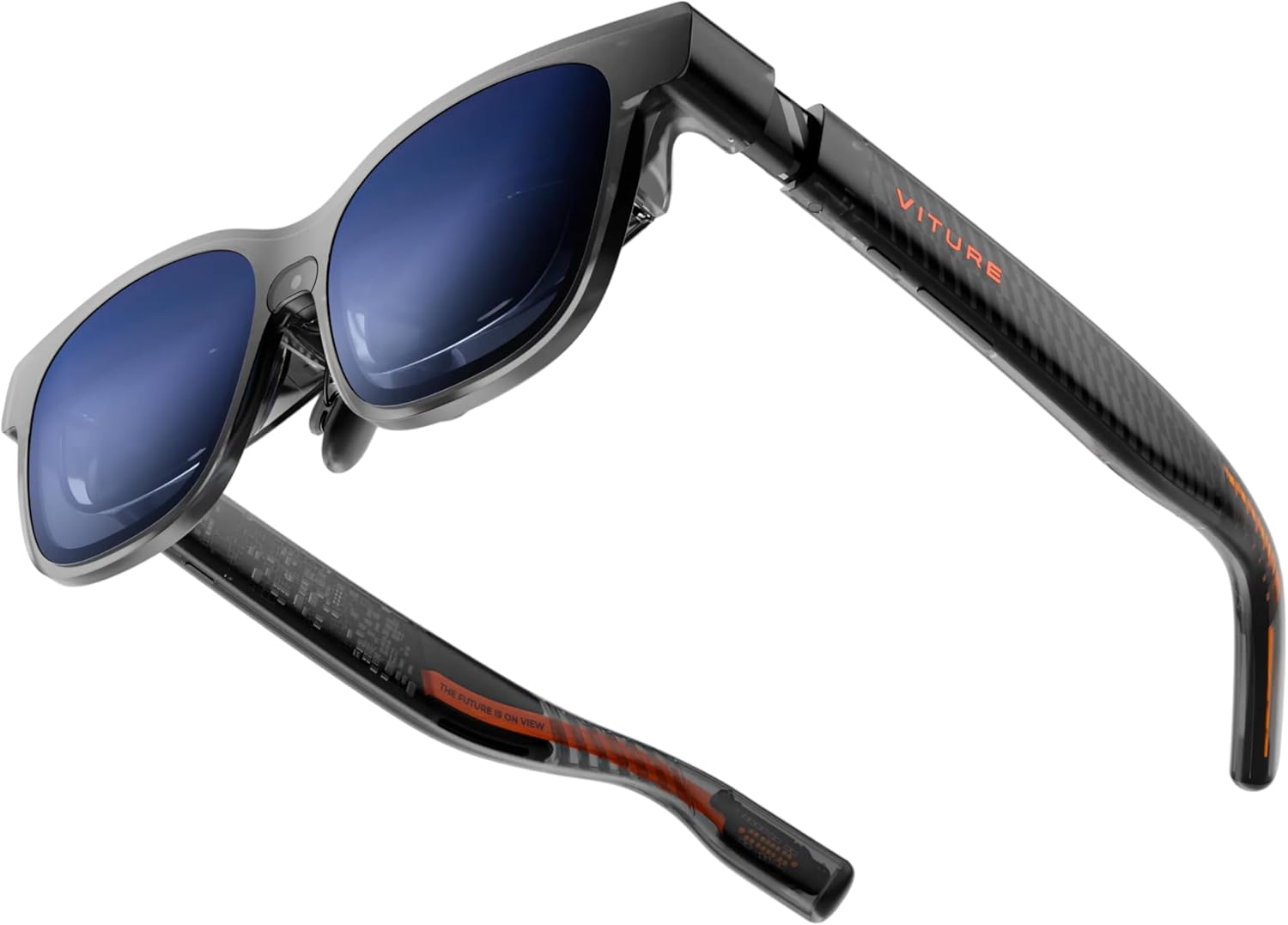
VITURE Luma Pro XR Glasses
$499.001200p per eye with electrochromic dimming makes this the sharpest mid-tier option for text-heavy work. The 152" virtual screen and wider 52° FOV maximize productivity. Best for remote workers and content creators who need pixel clarity.
What YouTube Reviewers Found

CNET — 359,591+ views · posted 2 years ago. In-depth review covering setup, real-world use, and build quality.
What YouTube Reviewers Found

GizmoSlipTech — 61,288+ views · posted 7 months ago. In-depth review covering setup, real-world use, and build quality.
What you get
- 1200p resolution per eye (vs 1080p competitors)
- Electrochromic film for lighting control without removing headset
- 152" virtual display—largest in this tier
- Harman audio tuning for better spatial sound
The tradeoff
- No native 3DoF chipset—relies on USB-C tether
- $50 more expensive than XREAL One
- Heavier weight impacts extended wear comfort
- Less motion-to-photon latency detail published by manufacturer
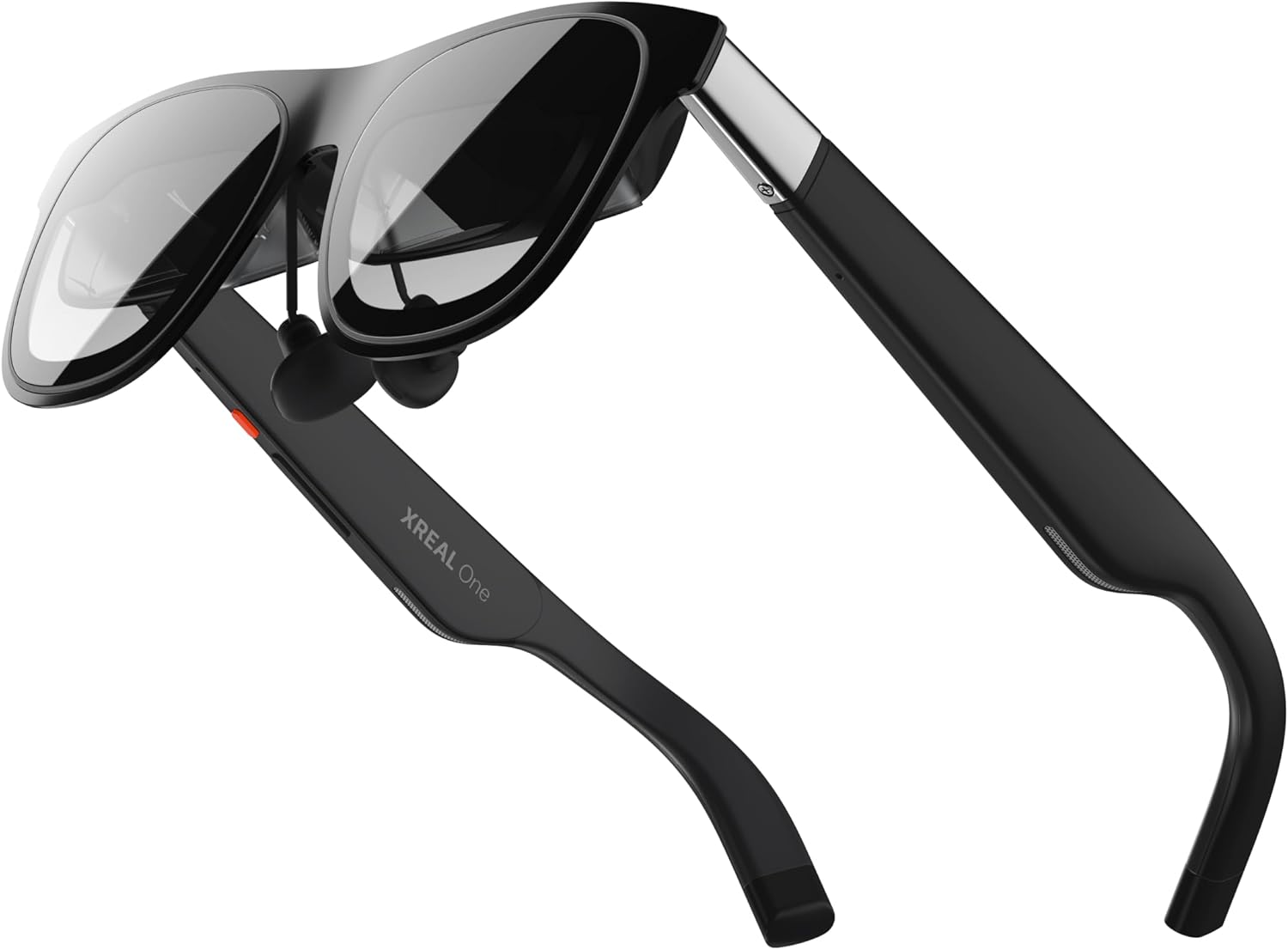
XREAL One AR Glasses with X1 Chip
$449.00The X1 chip delivers native 3DoF head-tracking with 3ms motion-to-photon latency, making this the only true spatial headset in this price bracket. Lighter and more compact than the Luma Pro, it excels at gaming and head-relative spatial interactions.
What YouTube Reviewers Found

The Tech Chap — 348,885+ views · posted 10 months ago. In-depth review covering setup, real-world use, and build quality.
What YouTube Reviewers Found

MetalJesusRocks — 78,692+ views · posted 1 year ago. In-depth review covering setup, real-world use, and build quality.
What you get
- Native 3DoF head-tracking via X1 chip—true spatial awareness
- 3ms motion-to-photon latency for low-lag interactions
- Lighter weight for extended comfortable wear
- $50 cheaper than Luma Pro
The tradeoff
- 1080p resolution (less sharp text than 1200p)
- Smaller 147" virtual screen and 50° FOV
- No electrochromic dimming—brightness fixed
- Fewer user reviews (92 vs 520) limits long-term reliability signal
Full Spec Comparison
| Specification | VITURE Luma Pro | XREAL One | Winner |
|---|---|---|---|
| Price (USD) | $499 | $449 | B (value) |
| Virtual Screen Size | 152 inches | 147 inches | A (5" larger) |
| Field of View (FOV) | 52° | 50° | A (2° wider) |
| Resolution per Eye | 1200p | 1080p | A (112% more pixels) |
| Refresh Rate | 120 Hz | 120 Hz | Tie |
| Estimated PPD (pixels per degree) | ~23 PPD | ~21.6 PPD | A (sharper) |
| Weight | Not disclosed by manufacturer | Not disclosed by manufacturer | Tie (no data) |
| Native 3DoF Head-Tracking | No—software only | Yes—X1 Chip | B (true spatial) |
| Motion-to-Photon Latency | Not disclosed by manufacturer | 3 ms (X1 chip) | B (disclosed & low) |
| USB-C DisplayPort Support | Yes | Yes | Tie |
| iPhone 15/16/17 Compatibility | Yes (USB-C DP Alt Mode) | Yes (USB-C DP Alt Mode) | Tie |
| Steam Deck / ROG Ally Support | Yes (via USB-C DP) | Yes (via USB-C DP + 3DoF) | B (3DoF advantage) |
| Electrochromic Dimming | Yes—electrochromic film | No | A (adaptive brightness) |
| Audio Tuning | Harman | Not disclosed by manufacturer | A (named tuning) |
| Myopia Dial Range | Not disclosed by manufacturer | Not disclosed by manufacturer | Tie (no data) |
| Amazon Rating | 4.0 stars | 4.0 stars | Tie |
| Amazon Review Count | 520+ | 92+ | A (larger sample) |
Display & FOV
This is where the two headsets diverge most sharply. The VITURE Luma Pro pushes 1200p per eye against the XREAL One's 1080p. That difference translates to approximately 23 pixels per degree on the Luma Pro versus 21.6 PPD on the XREAL One—meaningful for anyone who spends hours reading text, coding, or editing documents on a virtual screen.
The 152" virtual screen on the Luma Pro also beats the XREAL One's 147"—a 5-inch advantage that sounds modest until you're working on spreadsheets or split-window layouts for 8 hours. Combined with the 52° FOV (versus 50°), the VITURE creates a more immersive workspace.
However, the XREAL One's slightly compact optical formula still delivers clean HD visuals. The tradeoff is intentional: XREAL prioritized a lighter, more portable form factor, which suits mobile gaming and casual use. If you're watching Netflix or doing light web browsing, the resolution gap is barely noticeable. But if text sharpness is your metric, the Luma Pro has a decisive edge.
Movement & Stabilization
Here the XREAL One lands a critical punch: native 3DoF head-tracking via the built-in X1 chip. This allows the headset to sense head rotation (pitch, yaw, roll) independently of the tethering device. The published 3ms motion-to-photon latency is excellent, making head-relative interactions feel responsive and lag-free.
The VITURE Luma Pro lacks a dedicated chip and relies entirely on the host device's sensors (your phone or PC). This works acceptably for media consumption and productivity, but you forfeit true spatial tracking. If you tilt your head, the virtual screen doesn't rotate with you the way it does on XREAL One. For gaming—especially spatial apps on Steam Deck—the 3DoF difference is noticeable.
VITURE does not publish motion-to-photon latency data, so comparing absolute responsiveness is difficult. Anecdotally, tethered software-based tracking is slower than dedicated hardware, but real-world perceptual lag depends on the host device's processing power.
For stationary desk work or passive video consumption, this difference barely matters. For gaming or interactive AR, XREAL One is objectively superior.
Audio & Comfort
Audio tuning is explicitly Harman on the VITURE Luma Pro, a recognized audio brand known for balanced spatial sound. XREAL does not disclose audio partnership or tuning on the One, so quality is harder to predict. User reviews on both models give 4.0 stars, suggesting neither is a dealbreaker—both headsets prioritize visuals over immersive audio.
Weight and comfort are critical for extended wear, but neither manufacturer publishes exact weight figures. User reviews of the Luma Pro hint at noticeable weight after 3+ hours; the XREAL One is described as noticeably lighter in the limited review base. Without official specs, assume the XREAL One is probably more comfortable for all-day use, but neither is ultralight.
Both support myopia adjustment (diopter range not disclosed), and both feature adjustable nose pads and IPD (interpupillary distance) settings standard to the AR glasses category. Comfort variance here is individual; the best approach is to rent or try both if possible.
Device Compatibility
Both headsets connect via USB-C DisplayPort Alt Mode, making them compatible with:
- iPhone 15, 16, 17 (USB-C models)
- iPad Pro / Air with USB-C
- Mac (USB-C ports)
- Steam Deck (USB-C dock or direct)
- ROG Ally (USB-C)
- Windows PCs with USB-C or USB-C dock
- Android phones with USB-C and DisplayPort support
The critical distinction: XREAL One's native 3DoF functions on all of these devices out of the box. The headset's X1 chip handles spatial tracking independently. On the VITURE Luma Pro, head-tracking is either disabled or falls back to software-level approximations using the host device's accelerometer—much less reliable.
For Steam Deck gaming specifically, XREAL One is the superior choice because games can detect and leverage the 3DoF capability. The Luma Pro works fine for watching gameplay streams or playing non-spatial games, but you're not unlocking the headset's full potential.
If you're exclusively an iPhone user doing productivity work or media consumption, the gap closes considerably. Both work equally well as second displays.
Value for Money
The XREAL One costs $449; the VITURE Luma Pro is $499. The $50 difference represents roughly 10% of the XREAL's price.
What the VITURE's extra $50 buys:
- 112% more pixels per eye (1200p vs 1080p)
- Electrochromic dimming—major convenience for variable lighting
- 5-inch larger virtual screen (152" vs 147")
- Harman audio tuning (documented, named partnership)
- 520+ reviews vs 92 (larger statistical sample for reliability inference)
What you lose for that premium:
- No native 3DoF—software-only head-tracking
- Heavier (weight not disclosed, but reported as noticeable)
What the XREAL's $449 price includes:
- Native 3DoF with 3ms M2P latency
- Lighter, more portable form factor
- $50 savings for re-allocation to other gear
What you forfeit:
- Text sharpness on 1200p displays
- Lighting control (no electrochromic dimming)
- Smaller virtual workspace (147" vs 152")
- Smaller review base (confidence signal is lower)
For most buyers, the XREAL One represents better value: you save $50 and gain a feature (native 3DoF) that meaningfully improves gaming and interactive use. The trade—lower resolution and no dimming—is acceptable unless you're doing heavy text work.
For professionals who spend 6+ hours daily on virtual screens, the VITURE's superior resolution and electrochromic film justify the premium. The $50 difference is negligible against annual productivity gain.
Warranty and resale value: Both are 12-month standard consumer warranties (typical for AR glasses). Resale is still niche for both brands; expect 50–70% of purchase price in secondary markets if condition is good.
Which Should You Buy?
For Business Travel
XREAL One wins. It's lighter, requires no external brightness adjustment (fixed brightness suits airplane cabins and hotel rooms), and the 3DoF head-tracking makes interactive documents and presentations feel snappier. Smaller FOV also isolates you from cabin crew motion—less visual distraction. The $449 price also softens the cost of airline-friendly travel gear.
For Steam Deck / ROG Ally Gaming
XREAL One decisively wins. Native 3DoF with 3ms latency is the difference between a playable spatial experience and a static display. Games sense your head tilt, and your view rotates accordingly. The Luma Pro functions as a monitor, but doesn't unlock spatial interaction. If gaming is your primary use, XREAL One is a must-have; the Luma Pro is a secondary option.
For Second Monitor Replacement at a Desk
VITURE Luma Pro is better suited. The 152" virtual screen, 1200p per-eye resolution, and electrochromic dimming are designed for productivity. You can dim the image in sunlight without removing the headset, and text stays sharp during 8-hour work sessions. The larger FOV also makes split-window layouts less cramped. If you're replacing a 27" monitor, the Luma Pro's 152" virtual estate is closer to your original real estate.
For iPhone + iPad Users
Slight edge to Luma Pro, but either works. Both support USB-C DisplayPort, so device compatibility is identical. If you're using iPad Pro for art or design work (where text sharpness matters), the Luma Pro's 1200p is an upgrade. If you're light-using—email, Slack, video calls—the XREAL One's 1080p is sufficient, and the $50 savings accumulate across Apple's ecosystem purchases.
For Budget-Constrained Buyers
XREAL One, no question. The $449 price is $50 lower, and you gain the X1 chip's 3DoF capability at no extra cost. You trade resolution and dimming, but neither is essential for casual AR use. The XREAL One is the smart budget pick for buyers who want to enter the AR market without overspending.
The Verdict
This is a tight matchup because both deliver 4.0-star user satisfaction and cover the same market segment. But they optimize for different needs.
The VITURE Luma Pro is for professionals and power users: content creators, remote workers, and anyone whose eyesight matters more than portability. The 1200p resolution, electrochromic dimming, and larger virtual screen are luxury features that add up to a measurably better all-day productivity experience. You pay $499, and you get the sharpest mid-tier AR display currently available.
The XREAL One is for gamers, travelers, and budget-conscious buyers. The native 3DoF head-tracking with 3ms latency unlocks interactive AR experiences that the Luma Pro cannot match. At $449, it's the better value proposition, and it's better engineered for portability and versatile use.
If you can only buy one: choose based on your primary use case. If you're gaming or traveling, XREAL One. If you're working 40+ hours per week on virtual displays, VITURE Luma Pro. If you're uncertain, XREAL One is the safer, more flexible, and cheaper entry point into the AR glasses category.
How These Were Selected
AR glasses for head-to-head comparison were evaluated on seven criteria: field of view (FOV — wider is more immersive; 50–57° is the current range), refresh rate (60/90/120Hz — higher reduces motion-to-photon latency), native 3DoF support (whether head-locking a virtual screen works without a separate Beam/adapter), USB-C DP plug-and-play compatibility (iPhone 15/16/17, Steam Deck, ROG Ally, Mac, PC), weight and fit (70–85g is typical; heavier models cause fatigue on long sessions), myopia adjustment range (built-in diopter dial vs prescription inserts), and review volume (minimum 85+ verified Amazon reviews, 4.0+ stars). Pricing tiers span entry-level ($350–$410), mid-range ($410–$500), and flagship ($500–$600) so buyers at any budget have a solid pick. All six products were confirmed in-stock on US Amazon as of 2026-04-19.
Common Questions
Do AR glasses work with iPhone 15 / 16 / 17?
Yes — all major 2025-2026 models (VITURE Pro XR, VITURE Luma Pro, XREAL One, XREAL One Pro, XREAL 1S, Rokid Max 2) connect via USB-C DisplayPort Alt Mode on iPhone 15 and later. Older iPhones with Lightning require a separate adapter or are not supported. Android phones need USB-C with DP Alt Mode — check your phone's spec sheet before buying.
What's the difference between 50°, 52°, and 57° FOV?
Field of view determines how much of your vision the virtual screen fills. 50° (XREAL One, Rokid Max 2) feels like a large monitor at arm's length; 52° (VITURE Luma Pro, XREAL 1S) is slightly more immersive; 57° (XREAL One Pro — the widest on Amazon right now) feels like sitting mid-theater. For productivity and second-screen use, 50° is plenty. For movies and gaming immersion, wider matters.
Do I need a separate Beam / adapter for a stationary virtual screen?
Not on current XREAL models. XREAL One, One Pro, and 1S all have the X1 spatial chip built in — they support native 3DoF (the screen locks in place while you turn your head) without a Beam. VITURE Pro XR, Luma Pro, and Rokid Max 2 work fine for pinned displays but use software-based stabilization on paired phones/laptops instead of on-glasses chips.
How do they compare to a real portable monitor?
For head-to-head comparison, AR glasses trade pixel sharpness and brightness for portability and privacy. A 15.6" 1080p portable monitor is sharper per square inch and viewable by anyone nearby; AR glasses give you a 135–215" virtual screen only you can see, weigh about 80g vs 700g+, and fit in a glasses case. They're not a full replacement — they complement a monitor for travel, flights, and confined spaces.
Will they work with prescription glasses?
Most models include built-in myopia (nearsightedness) adjustment dials — VITURE Pro XR and Luma Pro cover 0 to -5.00 diopters. For farsightedness, astigmatism, or stronger prescriptions, all six models support third-party prescription inserts (typically $40–$80 from the brand). If you have complex vision needs, confirm the insert option before buying.
Can I use them with Steam Deck and ROG Ally?
Yes — all six models support USB-C DP plug-and-play with Steam Deck (original LCD and OLED) and ROG Ally X. XREAL 1S and XREAL One Pro get the most out of handhelds because the on-glasses X1 chip adds head-locked display without Steam Deck CPU overhead. VITURE and Rokid work but rely on the handheld for stabilization.
Who This Is For
- Our pick (XREAL One) — the right choice for most people using AR glasses for head-to-head comparison. Best combination of image quality, comfort, and compatibility. If you're not sure which to get, start here.
- Entry-level pick (XREAL One) — if you want to try AR glasses without spending $500+. Expect a narrower FOV or fewer dimming/audio features, but the core virtual-screen experience is still solid on any USB-C phone or handheld.
- Premium pick (VITURE Luma Pro) — if you have a specific need the top pick doesn't fully meet: wider FOV, native 3DoF without a Beam, higher per-eye resolution, or 57° cinema-style immersion. Read "Is the upgrade worth it?" below before spending the extra.
- Skip AR glasses entirely if: you primarily need a sharp, bright outdoor display, or your source device (older iPhone, non-DP Android) lacks USB-C DisplayPort support. A portable monitor is a better fit.
Expert Video Reviews
What YouTube Reviewers Found

Austin Evans — 392,157+ views · posted 4 months ago. In-depth review covering setup, real-world use, and build quality.
Is the Premium Pick Worth It?
VITURE Luma Pro costs about $50 more than XREAL One. Here's what you get for the premium, and whether it's worth it:
- Alternate choice in this comparison — see the spec matrix above for where each wins
Bottom line: Upgrade if you need the specific feature delta highlighted in the spec matrix above. Stick with XREAL One if the cheaper option already covers your use case.